
There is a new version of Quite Imposing Plus: 6.0e, released on 11 June 2026. We recommend this update for all Mac users running macOS Tahoe — on that system, text can overlap on screen, making the software difficult to use. The update also includes a number of fixes that are useful for all users.
Who is this especially important for?
The key fix resolves an issue that occurs only with this specific combination: a Mac running macOS Tahoe (macOS 26) and the latest Acrobat update (2026.001.21651, released by Adobe on 5 June 2026). In that situation, the text in the dialogs (screens) of Quite Imposing Plus may overlap.
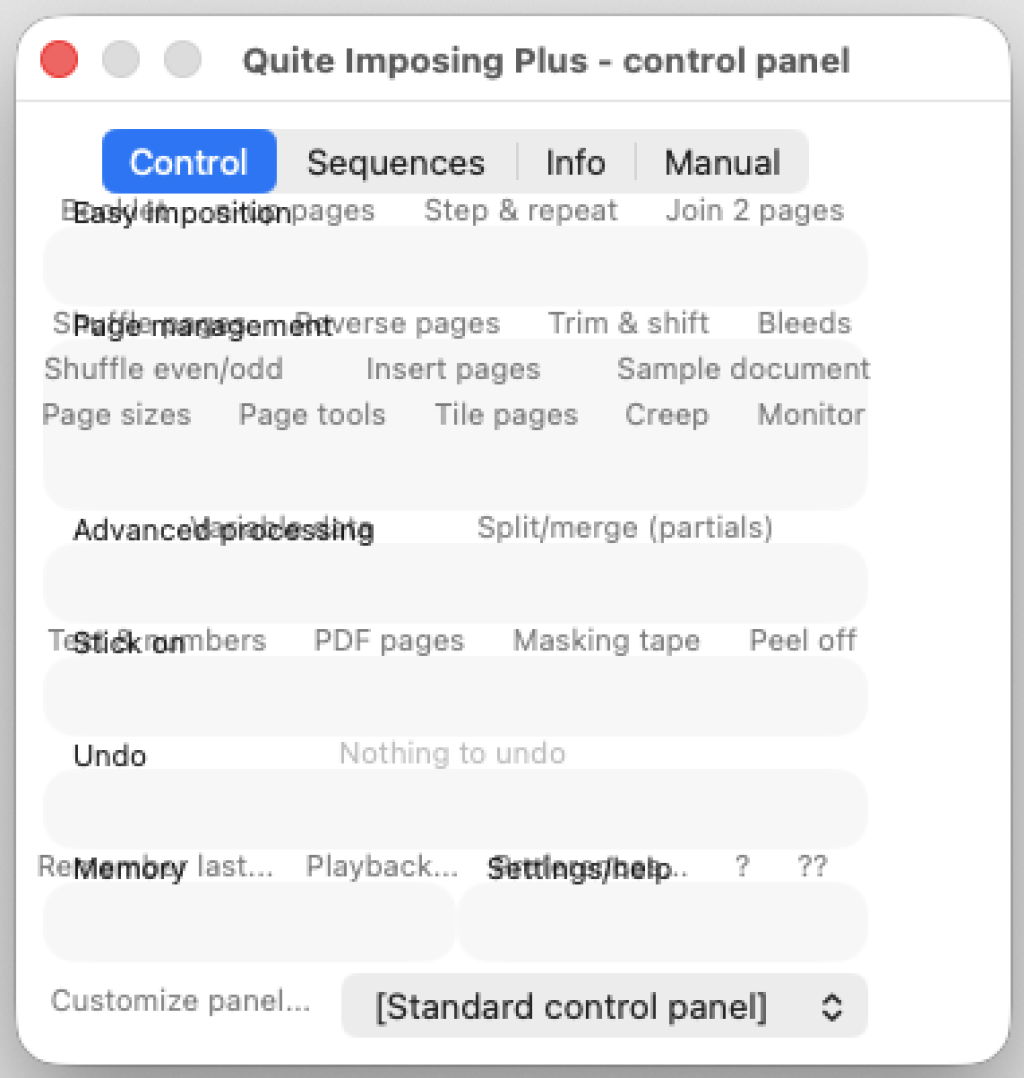
Why this matters: many users have automatic updates enabled, so we expect to see this more often in the coming days and weeks. What happens exactly: a box with a label — such as “Easy Imposition” in the example — has its contents shifted upwards, so it overlaps the text.
Whether this is a bug in the new Acrobat, something in Tahoe, or a combination of both: Quite has now laid out the boxes in a different way, so the issue disappears.
Other improvements for all users
Alongside the Tahoe fix, there are more improvements that apply to everyone:
Upgrading to V6 did not import page sizes set up in earlier versions — this now works correctly.
The “invalid color space” message when imposing with the “Preserve PDF/X” option has been resolved.
Problems with alignment and scaling for N-Up and Step & Repeat have been fixed.
Download and update
Do you work with Quite Imposing Plus? Download version 6.0e from the official Quite download page. Questions, or need help updating? Get in touch — we are happy to help.